GNOME Shell 47+

Your favourite movie
as a screensaver

Play any local .mp4 video file as a fullscreen screensaver across all your monitors — powered by mpv with hardware acceleration.

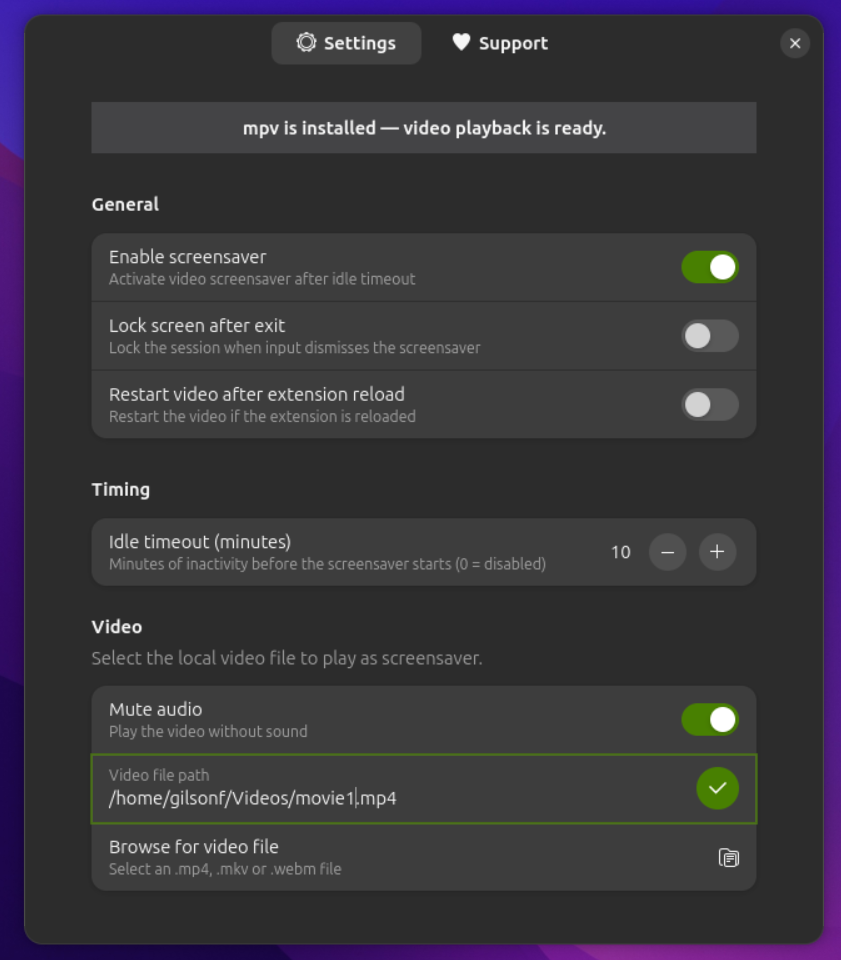
Movie Screensaver preferences window

⚙️ Preferences window — idle timeout, video path, lock screen & mute options

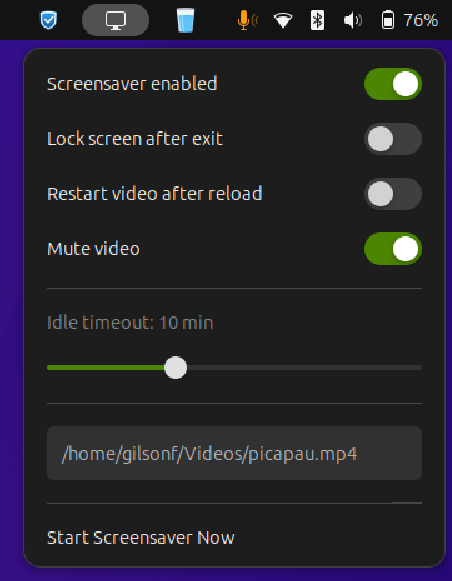
Movie Screensaver top-bar indicator

🎬 Top-bar indicator — quick-access controls without opening preferences

Everything a screensaver should be

Tight integration with GNOME Shell — no system hacks, no background daemons.

🖥️

All monitors covered

Video plays on every connected display simultaneously. Secondary monitors are blacked out if a direct output can't be targeted.

Hardware acceleration

Runs mpv with --hwdec=auto — offloads decoding to your GPU for smooth 4K playback with minimal CPU usage.

⏱️

Configurable idle timeout

Set how many minutes of inactivity trigger the screensaver. Uses GNOME's native idle monitor for reliable detection.

🔁

Resumes where it left off

mpv's watch_later feature saves the playback position. The next time the screensaver starts, it continues from the same point.

🔒

Optional screen lock

Automatically lock the session when the screensaver is dismissed — ideal for shared workstations and public displays.

🔇

Mute toggle

Enable or disable audio directly from the top-bar indicator or the preferences window. Secondary screens are always muted to prevent duplicate audio.

🎛️

Top-bar quick controls

A discreet panel indicator gives instant access to enable/disable, mute, and "Start Now" without opening the full preferences window.

🛡️

Suspend-aware

Listens to the system's sleep signal via logind and stops the screensaver cleanly before the machine suspends.

🌐

Wayland & X11

First-class support for Wayland using Mutter's output APIs. Falls back gracefully to X11 screen-index targeting on older setups.
Requirements

Movie Screensaver is a pure GNOME Shell extension — the only external dependency is mpv.

Dependency Version Notes
GNOME Shell 47, 48 or 49 Required
mpv any recent Required — the video player backend
GJS bundled with GNOME Included — no separate install needed

Install mpv for your distribution:

# Ubuntu / Debian
sudo apt install mpv

# Fedora / RHEL
sudo dnf install mpv

# Arch Linux
sudo pacman -S mpv

# openSUSE
sudo zypper install mpv

Installation

Clone the repository and run the install script — done in under a minute.

01

Clone the repo

git clone https://github.com/\
gilson-fonsaca/movie_screensaver.git
cd movie_screensaver

02

Run the installer

chmod +x install.sh
./install.sh
Compiles the GSettings schema and copies the extension to ~/.local/share/gnome-shell/extensions/.

03

Restart GNOME Shell

On X11: press Alt+F2, type r, hit Enter.

On Wayland: log out and log back in.

04

Enable & configure

Open GNOME Extensions, enable Movie Screensaver, then click the top-bar icon to set your video file and idle timeout.

To uninstall:

./uninstall.sh

Add --keep-settings to preserve your GSettings configuration.

Support the project

Movie Screensaver is free and open-source. If it brightens your desktop, consider buying the developer a coffee.